AI voice agents inside RingCentral RingCX
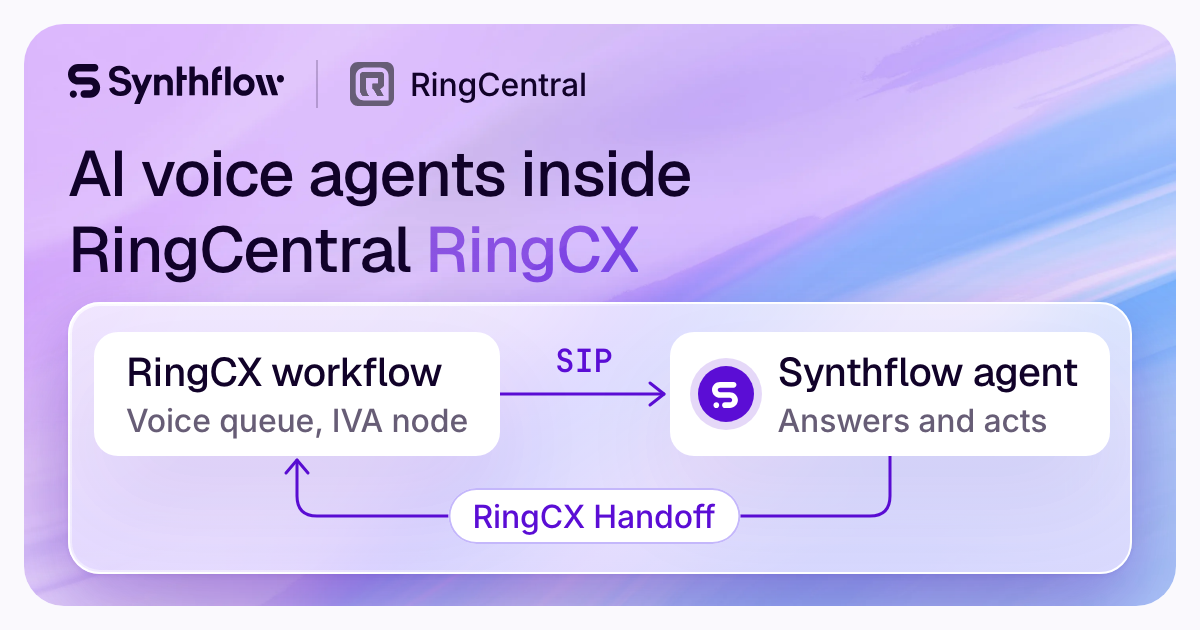
Synthflow, an enterprise AI agent platform for customer conversations, runs its AI voice agents inside RingCentral RingCX voice queues as an Intelligent Virtual Agent (IVA). RingCX sends calls to the agent over SIP, and the RingCX Handoff action returns each call to the RingCX workflow.
Talk to sales
RingCX is one of Synthflow's Tier 1 telephony integrations: a native integration that Synthflow engineering tests and supports.
How it works
How does a RingCX call reach a Synthflow agent?
RingCX stays in charge of the call. Your workflow sends the caller to the agent, the agent handles the conversation, and the call comes back to your workflow with what the agent collected.
- A call reaches the IVA node in your RingCX workflow. In Workflow Studio, the IVA node sends the call to your Synthflow agent over SIP. A JavaScript node before it passes the caller's context: the caller's number (ANI), the dialed number (DNIS), the call ID and any field you add, such as an account ID.
- The Synthflow agent answers and acts. RingCX carries the context in the X-Bot-Context SIP header, so the agent can use each field in its greeting, its prompt and its actions. It follows its prompt and runs its actions while the caller is on the line, for example booking an appointment or collecting the details your team needs.
- The RingCX Handoff action returns the call. When its condition is met, such as "When the customer says goodbye", the action ends the Synthflow IVA session and returns the call to the RingCX workflow, with a payload of the fields you define: the caller's intent, an account number, an appointment preference.
- Your workflow takes it from there. The call continues from the IVA node's Success connection. A JavaScript node after the IVA node reads the payload, and your workflow routes the call with RingCX's own nodes.
Your system
What stays in RingCentral?
Your numbers, queues, workflows and routing stay in RingCX. Callers dial the numbers they already know, you choose in Workflow Studio which calls reach the IVA node, and each call comes back to the same workflow when the agent is done.
If an IVA session doesn't complete, the call follows the IVA node's Failed connection, for example to a queue, and the caller stays connected. Recordings and transcripts of RingCX calls appear in the agent's call history in Synthflow, as with any other Synthflow call.
Setup
What does setup take?
- Admin access to RingCX.
- A Synthflow Enterprise plan with a deployed agent.
- A RingCX workflow channel number for the agent.
Then the setup runs in three places.
The SIP URI must carry the number before the @: without it, Synthflow can't tell which agent should take the call. Every step, with the JavaScript node's script, is in the RingCX setup guide. Where your agreement includes launch support, Synthflow's forward-deployed engineers build, test and launch the agent with your team.
RingCX and RingEX
RingCX or RingEX: which RingCentral integration fits?
RingCentral has two products that connect to Synthflow in different ways. RingCX, RingCentral's contact center platform, routes voice queue calls into Synthflow natively, and it is the integration Synthflow recommends for RingCentral contact centers. RingEX, RingCentral's business phone system, connects through a SIP-extension setup that is being sunset.
The RingEX SIP-extension setup depends on RingCentral behavior outside Synthflow's control, so Synthflow can no longer guarantee its reliability. On RingEX, Synthflow recommends forwarding your RingEX number over the PSTN to a Synthflow number or a Twilio number. You can also use the RingCX integration, or route calls straight to Synthflow over SIP; your account manager helps you choose. The RingCentral overview in Synthflow's docs compares the two.
Security
How secure is Synthflow?
Synthflow's Trust Center lists SOC 2 Type 2, ISO/IEC 27001, GDPR and HIPAA (self-attested), and your security team can request the reports there. You choose a US or EU data region when you create a workspace, and Synthflow does not use customer conversation data to train its AI models. How Synthflow secures calls and data.
Pricing
How is Synthflow sold?
Synthflow is sold as an annual enterprise agreement, scoped to your call volume, phone system, integrations, security needs and launch support. It has no free plan or trial and no rate by the minute. The RingCentral integrations are on the Enterprise plan. Synthflow's pricing.
About Synthflow
What is Synthflow?
Synthflow is an enterprise AI agent platform for customer conversations. Its AI voice agents answer and make phone calls for contact centers, BPOs and multi-location brands, on Synthflow's own telephony. RingCentral RingCX is one of its contact center integrations, beside Five9 and Zoom. To compare platforms, read AI call center software, compared.
1M+ calls daily
on Synthflow's platform.
99.99% uptime.
100+ enterprise customers.
with hosting in the US or the EU.
Questions about Synthflow and RingCentral
Does Synthflow integrate with RingCentral?
Which RingCentral products does Synthflow work with?
Can the agent make outbound calls through RingCentral?
What does the RingCX integration need?
Can it run in the US or EU region?
What happens when a caller needs a person?
How do I start with Synthflow on RingCX?
Tell Synthflow's team which RingCX queues you want an agent on and how your workflows run today, and we'll scope the first deployment with you. Bring your RingCX admin in early: the IVA integration and the workflow are set up on the RingCX side.
Talk to sales