AI voice agents inside your Five9 call flow
Synthflow is an accredited AI provider in Five9's AI Agent Connect program for Five9 VCC. Your Five9 workflow sends a call to a Synthflow voice agent, which handles the conversation and hands the call back with what it learned, so Five9 keeps the routing.
Talk to sales
Five9 lists Synthflow among the accredited providers in its AI Agent Connect documentation.
How it works
How does Synthflow work inside Five9?
Five9 stays in charge of the call. Your Five9 workflow sends the caller to a Synthflow voice agent, the agent handles the conversation, and the Five9 Handoff action gives the call back to Five9 with what the agent learned.
- A call enters your Five9 workflow. Your IVR script in Five9 VCC transfers it to the agent's AI phone number, with call details such as the caller's number and the campaign.
- The Synthflow agent handles the conversation. It answers, works through the caller's request with the actions and knowledge you give it, and collects what your team needs to know.
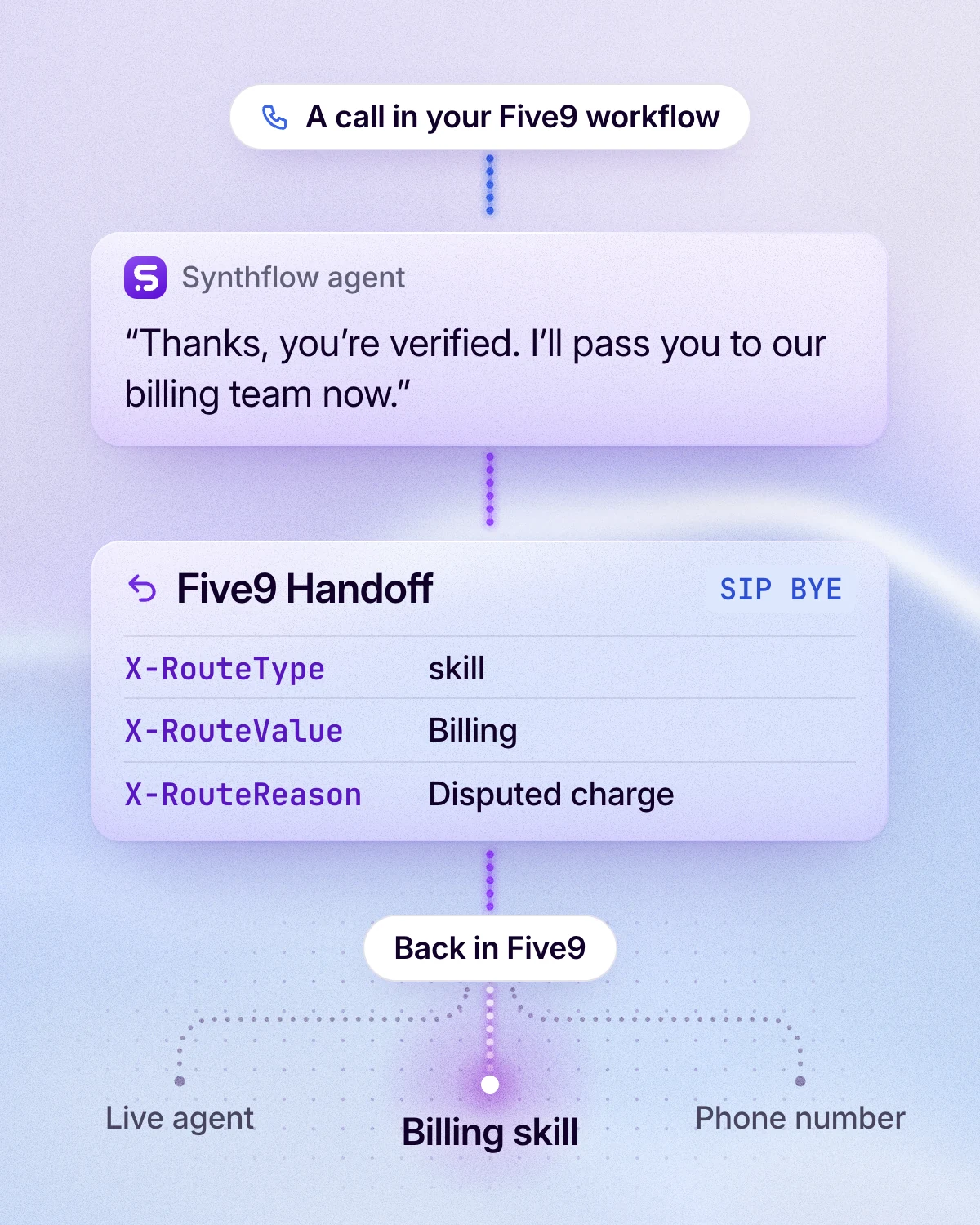
- The Five9 Handoff action returns the call. When its condition is met, Synthflow ends its part of the call with a SIP BYE that carries X-Headers: where the call goes next, and why.
- Five9 routes on those values. Five9 maps each header into a call variable, and your workflow sends the call to a skill, an agent or a number, or ends it.
Callers keep dialing the numbers they know. The AI phone numbers Five9 assigns only route calls to your agents and can't be dialed from outside. Your queues, agents and reporting stay in Five9.
Setup
What does setup need?
- A Synthflow Enterprise plan, with AI Agent Connect activated by your Synthflow account manager.
- A deployed Synthflow agent.
- A Five9 VCC account with admin access and an active domain.
- AI Agent Connect activated by Five9: your Five9 account team adds the activation SKUs 548-0132 and 548-0133 to your account.
Then each side does its part.
Five9 authenticates Synthflow by IP, so there are no SIP credentials to manage. Your Five9 portal and your Synthflow workspace need to run in the same region, US or EU; the Global region isn't supported.
If you want hands-on help, Synthflow's forward-deployed engineers can build and test the agent with your teams as part of a services engagement. Every step is in the Five9 setup guide.
Data
What data goes back to Five9?
Data moves both ways in SIP X-Headers.
Into the agent, when the call arrives: the caller's number (call.ANI), the dialed number (call.DNIS), the call and session IDs, the campaign's name and ID, the domain ID and the start time. Five9's team can add more call variables.
Back to Five9, when the agent hands off: three headers Five9 needs to route the call, plus any custom headers your workflow uses.
Each value can be fixed, taken from a conversation variable, or extracted by the agent during the call, such as the reason for the call. Five9 puts every header into a call variable in its Synthflow variable group, where your workflow and your reports can use it.
The transcript and the reason the call ended don't need to travel as headers: Synthflow keeps them on the call, and Five9 can fetch them through the Synthflow API. If a caller hangs up before the agent finishes, Five9 retrieves what the agent collected up to then. Keep custom headers to ten in each direction and about 500 characters in all.
Handoff
What happens when the caller needs a person?
The agent hands the call back to Five9, and Five9 puts the caller through. Synthflow doesn't start transfers on Five9 trunks itself: the Five9 Handoff action returns the call to your workflow, and Five9's own routing and queues pick the destination from X-RouteType and X-RouteValue, whether that is a skill, a live agent or a phone number.
So a caller reaches your people through the same queues and skills as every other Five9 call, and X-RouteReason tells your reports why the call came.
You decide when the handoff happens. Each Five9 Handoff action has a condition in plain words, such as "When the caller asks for a person".
About Synthflow
What is Synthflow?
Synthflow builds AI voice agents that answer and make phone calls for enterprises, on its own telephony. Five9 is one of its contact center integrations.
1M+ calls daily
on Synthflow's platform.
99.99% uptime.
3,000+ businesses
use Synthflow.
with hosting in the US or the EU.
Questions about Synthflow and Five9
Is Synthflow an accredited Five9 AI Agent Connect provider?
Do I buy Synthflow through Five9?
Which Synthflow plan does the Five9 integration need?
Can I run more than one agent on Five9?
Does it work with Five9 in the EU?
How do I start with Synthflow on Five9?
Tell Synthflow's team which calls you want an agent to take and how your Five9 workflow runs today. Bring your Five9 account team in early: Synthflow activates AI Agent Connect on its side, and Five9 activates it on yours.
Talk to sales