


Inbound call center software used to be a straightforward purchase: pick a platform, route calls to agents, measure handle time, and hope for the best. However, in 2026, the buying process has fractured significantly.
Pricing models are much more complicated than they used to be; split across per-seat, per-minute, and consumption-based structures – sometimes within the same product. And while practically every platform markets itself as "AI-powered," what that label actually includes at your price tier varies wildly from one provider to the next.
We built this guide for CX leaders and IT decision-makers actively building a shortlist. It's organized by buying scenarios, not alphabetical rankings, so you can skip straight to your situation. Each section covers the features that move FCR and AHT, where AI capabilities are gated behind premium plans, and a buyer checklist tied directly to operational outcomes.
What Inbound Call Center Software Does in 2026
Inbound call center software handles incoming customer contacts, which often includes handling actions like:
- Routing calls.
- Supporting agents during conversations.
- Giving supervisors live visibility.
- Capturing data after the interaction ends.
If you're searching for "call center software," though, you probably need more than just phone coverage. Most enterprise buyers are actually shopping for contact center software: Voice plus chat, email, SMS, and social channels running through a single routing engine. The terminology just hasn't caught up with how people actually buy. (Outbound software is a different category entirely as it powers dialing campaigns, lead progression, and proactive outreach.)
On top of that, the contact center software market hit $49.64 billion in 2025 and is projected to reach $400.19 billion by 2035. When you have that kind of growth, it’s very common to also see many overlapping feature sets alongside pricing structures that don't always make it obvious what you're paying for.
That makes comparing platforms feature-by-feature a losing game – every product page looks the same after a while. A more useful approach is to evaluate how each capability affects the two metrics your leadership team is actually tracking:
- First Call Resolution (FCR), which measures whether the customer's issue was solved on the first contact.
- Average Handle Time (AHT), which measures how long a resolution takes.
When those two numbers move in the right direction, cost, satisfaction, and retention tend to follow.
Skills-Based Routing and the ACD
Everything starts with the Automatic Call Distributor (ACD). It receives each inbound contact and makes a routing decision – matching the caller to an agent based on:
- Skill set – does the agent have the right expertise for this issue?
- Priority level – is this a VIP account or an escalation?
- Current workload – who's available without being overburdened?
The IVR collects information upfront; the ACD acts on it. When routing works, calls land on the right desk the first time. When it doesn't, customers repeat themselves, and FCR drops.
The industry-average FCR sits around 70%, which means that three in ten callers aren't resolving their issue on the first attempt.
CRM Screen Pops
Screen pops pull the customer's record before the agent even picks up – account history, previous interactions, open tickets – cutting out the opening minute spent verifying information the system already has. Average call duration has climbed to 7 minutes and 6 seconds, the highest it's been in two decades.
Queue Callbacks and Supervisor Tools
Callbacks let customers hold their place in line without sitting on hold, cutting abandonment during volume spikes. Whisper, barge, and live dashboards give managers real-time floor visibility – no more waiting until the weekly report to find out a queue blew up on Tuesday.
How AI Fits Into Inbound Call Center Software
Every platform in the market calls itself "AI-powered." What that actually means at your price point is a different story.
AI capabilities in inbound call center software fall across a wide spectrum. At a high level:
- Conversational IVR – Natural language replaces touch-tone menus so that callers describe their issue in their own words instead of pressing 1, 2, or 3. Better than legacy IVR, but still limited to routing.
- Real-time agent assist and automated QA – AI surfaces knowledge articles mid-call, scores 100% of interactions (instead of the 2–5% most teams review manually), and generates post-call summaries. Metrigy research found AI summaries cut after-call work by roughly 35%.
- Virtual agents – AI handles routine calls end-to-end: Identity verification, order status, ticket creation, appointment booking. Complex cases get warm-transferred to a human with full context attached.
These capabilities are valuable, but the problem is that many CCaaS providers gate them behind premium tiers or sell them as separately priced add-ons. Zendesk charges $1.50–$2.00 per AI resolution on top of suite pricing, and RingCentral reserves full AI for its most expensive plan.
In reality, "AI-powered" in a product description tells you nothing about what's included at your price point.
Traditional IVR vs. Conversational AI
The same vagueness applies to how platforms describe their IVR – “conversational” can mean anything from basic speech recognition to a full multi-turn AI interaction. Let’s see what the actual difference is:
| Traditional IVR | Conversational AI | |
|---|---|---|
| Input | Touch-tone menus ("Press 1 for billing") | Natural language ("I need to update my payment method") |
| Handling interruptions | Can't – caller must wait for the full prompt | Processes mid-sentence corrections in real time |
| Context | Resets with each menu level | Maintains multi-turn conversation history |
| Outcome | Routes to a queue | Can resolve the issue or transfer with full context |
"The question buyers should be asking is not whether a platform has AI, but what that AI actually does when the call gets complicated. A system that understands intent, holds context through interruptions, and completes the work end-to-end is fundamentally different from one that just replaces a touch-tone menu with a voice prompt."
– Eyal Novotny, Director of Professional Services, Synthflow
Synthflow sits at the virtual-agent end of this spectrum. Its LLM-native conversation engine runs on owned telephony infrastructure – not a third-party carrier – with pre-deployment simulation through the BELL Framework (4–8 weeks of automated stress-testing, including adversarial prompts, before any live call).
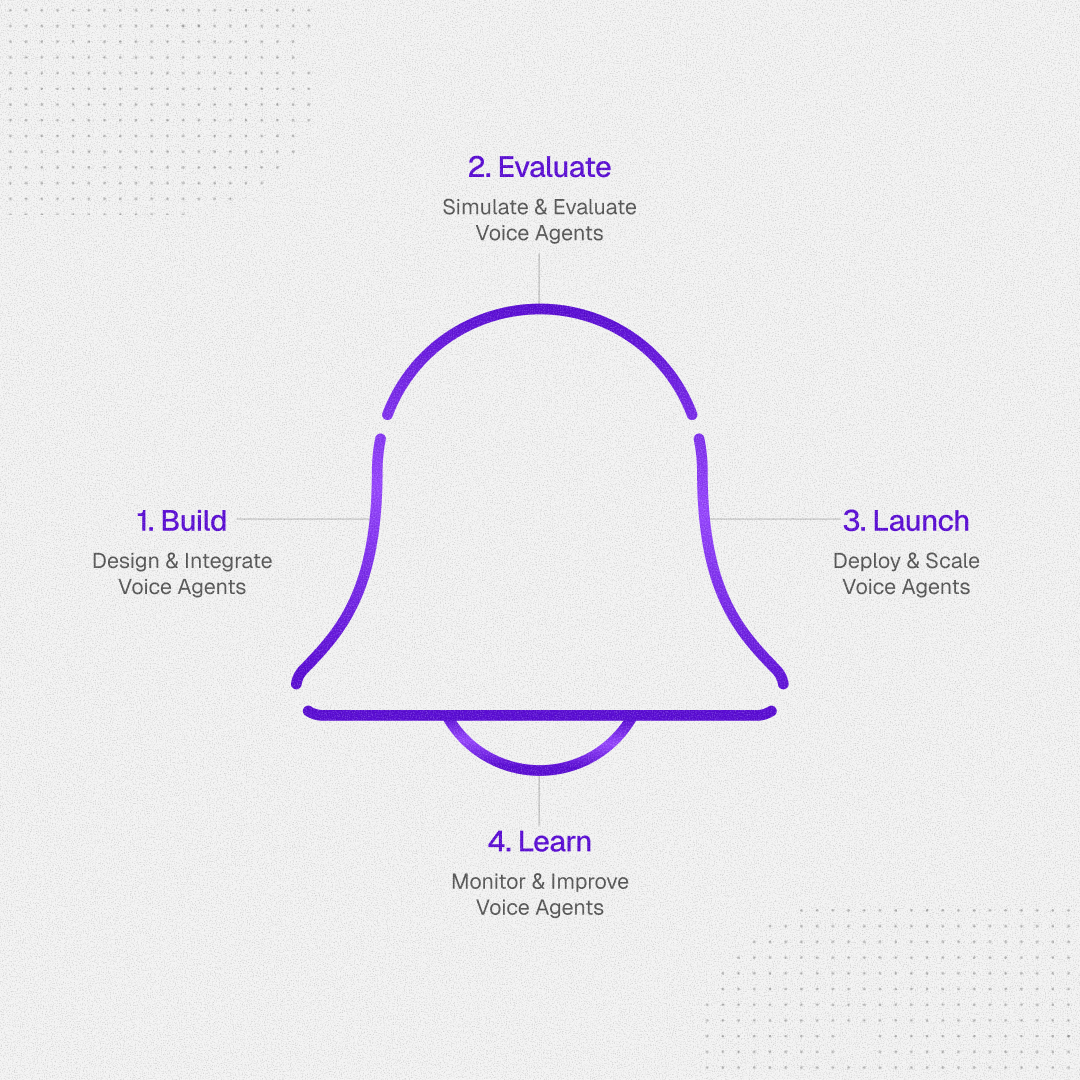
Through its Freshworks partnership, the platform automated 65% of routine voice requests, cut wait times by 75%, and reduced agent workload by up to 60%.
The Best Inbound Call Center Software for Each Buying Scenario
Instead of ranking these platforms from best to worst, we’ve arranged them by purpose and where your team sits. Your choice will depend on factors like how many agents you have, what you're trying to automate, and which systems you're already running.
Synthflow – Best for Automating Tier-1 Volume
Most inbound call center software focuses on getting calls to the right human faster. Synthflow takes a different approach: its AI agents handle routine calls from start to finish – verifying identity, pulling order status, creating tickets, booking appointments – then warm-transfer anything complex to a human with the full conversation attached.
It's an AI-native conversational AI platform, not a traditional CCaaS. Voice is the primary channel, with SMS, chat widget, and WhatsApp also live.
For example, a $230M BPO operator went from manual processes to 600K+ monthly AI-handled calls across 40+ agents – live in 60 days, zero new hires
And for teams managing agents at scale, Aurora lets operators build, update, and improve voice agents in plain language instead of clicking through configuration screens. One agency partner currently runs 700+ agents through it.
Watch for: Synthflow isn't a drop-in CCaaS replacement. There's no traditional agent desktop or workforce management module, and it's designed to sit alongside platforms like Cisco, Five9, Avaya, Genesys, and RingCentral as an automation layer.
Nextiva – Best for Unified Internal Comms and Customer Ops in One Stack
Nextiva bundles UCaaS and CCaaS into one platform, which means internal team messaging, video, and phone share the same environment as your contact center. For organizations tired of managing separate systems for employee collaboration and customer support, that consolidation is the pitch.
Contact center pricing starts at $75/agent/month (Essential). Nextiva also sells separate business phone plans starting around $20/user/month – but those don't include call center features like ACD, IVR, or screen pop.
Watch for:
- The $75 contact center pricing and the $20 phone plans live on different pages, and it's easy to confuse them during evaluation.
- Skills-based routing is capped at five rules on Essential and only becomes unlimited on the Premium tier.
- AI transcription and summarization are usage-based across all plans with no published per-minute rate.
Zendesk – Best for Teams Already Running Zendesk for Support
If your support operation already lives in Zendesk, adding voice through their native call center makes sense – inbound calls turn into tickets automatically, and agents handle everything from the same workspace they already know. That ticket-workflow connection is the real differentiator here, not the phone system itself.
Pricing starts at $55/agent/month (Suite Team) with a 14-day free trial and access to 1,000+ marketplace integrations.
Watch for: AI agents are a separate, usage-based add-on priced at $1.50–$2.00 per resolution on top of your Suite plan. That cost can scale quickly at high volumes, so model it before committing.
Aircall – Best for Mid-Market Teams Needing CRM Integration Fast
Aircall's strength is speed-to-value. Essentials starts at $30/license/month (annual, 3-license minimum) with 250+ integrations, including HubSpot, Salesforce, Zendesk, and Shopify. Professional at $50/license/month adds smart routing, advanced analytics, and Salesforce CTI. For teams of 15–50 agents who need a phone system that plugs into their CRM by the end of the week, it's hard to beat.
Every account gets 50 free AI Voice Agent minutes – enough to test, not enough to run production. Aircall's separate AI Voice Agent product starts from $0.19/minute at higher volumes.
Watch for: The base plans cover calling well, but AI capabilities are spread across separately priced add-ons (AI Assist at $9/license/month, AI Assist Pro at $49/license/month, AI Voice Agent by the minute). Know which AI features you actually need before comparing the sticker price.
RingCentral (RingCX) – Best for One-Platform Employee Collaboration + Customer Ops
RingCentral's play is convergence: RingCX (contact center) and RingEX (business communications) share a directory, presence sync, and unified messaging. If your organization genuinely uses both – agents taking customer calls and collaborating with back-office teams in the same app – the integration is tighter than stitching two separate products together.
RingCX Standard starts at $65/agent/month with voice and 20+ digital channels included.
Watch for: AI features are heavily tiered.
- Standard includes only the AI Receptionist as an add-on.
- Agent Assist and Quality Management require Professional ($95/agent/month).
- Supervisor Assist, Interaction Analytics, and Workforce Management don't appear until Elite ($145/agent/month).
The convergence value only pays off if the organization actually uses both the UCaaS and CCaaS sides – otherwise, you're paying for half a platform you won't touch.
Talkdesk – Best for Healthcare and Finance Teams Shipping AI Fast
Talkdesk has leaned hard into industry-specific workflows. Its Experience Clouds come with pre-built EHR integrations for healthcare and banking workflows for financial services, at $225/user/month. For regulated verticals where time-to-compliance is the real cost, that premium buys months off implementation – and that calculus shifts again when most of the routine inbound volume can be resolved before it ever hits a licensed agent.
The base pricing is a bit misleading at first glance. Digital Essentials starts at $85/user/month, but that covers email, chat, SMS, and social only. Voice starts at $105/user/month (Voice Essentials). If you're evaluating inbound call center software, the $105 tier is your real starting point.
Talkdesk's AI suite – Autopilot (generative AI virtual agent), Copilot (real-time agent assist), Navigator (AI-powered routing) – is separately priced on top of the base plan.
Watch for: The $85 headline is the digital-only tier – voice starts at $105. Autopilot, Copilot, and Experience Clouds are all priced separately on top, so the sticker price won't reflect your actual spend without a bundled quote.
Dialpad – Best for Embedded Conversation Intelligence from Day One
Dialpad builds AI into the base license in a way most competitors don't. Even at Essentials ($80/user/month), you get real-time transcription, call recording, and agent status monitoring.
The platform also offers a separate AI Agents product with conversation-based pricing for autonomous interactions, distinct from the contact center subscription.
Watch for: The features that make Dialpad's AI story compelling at the enterprise level – AI CSAT prediction, automated quality management, workforce management – all live on the Premium tier at $150/user/month. And the contact center product is separate from Dialpad Connect (their UCaaS offering), so costs stack if your team needs both.
CloudTalk – Best for Adding an AI Voice Layer to Your Existing Stack
CloudTalk splits its product into two tracks: A business phone system for human agents and an AI voice agent layer that handles calls autonomously. The two are priced separately, which gives teams flexibility but also means you need to model total cost carefully.
On the AI side, the entry point is free – the AI Receptionist tier includes 50 minutes per month for front desk coverage, after-hours routing, and FAQ handling. For teams that need AI agents resolving multi-step workflows (identity verification, payment handling, calendar sync), the AI Specialist tier runs €349/month with 1,000 included minutes. High-volume operations can negotiate custom per-minute rates starting at $0.15/minute above 10,000 minutes.
CRM integrations cover the mid-market stack: HubSpot, Salesforce, Pipedrive, Zendesk, plus 100+ others.
Watch for: The free tier covers 50 minutes – pilot capacity, not production. With no plan between free and AI Specialist ($349/month for 1,000 minutes), CloudTalk works best when you already know which side of that line your volume sits on. Model expected monthly minutes against both tiers before committing.
How to Shortlist the Right Platform for Your Team
Once you've reviewed the platforms, the shortlist comes down to three operational outcomes. Match each one to the capabilities that actually move it.
| Outcome | What to look for |
|---|---|
| Reducing AHT | CRM screen pops that surface customer history before pickup, AI-generated call summaries that cut after-call work, unified agent desktops that collapse multiple tools into one view |
| Improving FCR | Skills-based routing is granular enough to match caller intent to agent expertise, conversational IVR with intent recognition (not menu navigation), and real-time knowledge surfacing during live calls |
| Supporting distributed/remote teams | Cloud-native architecture with softphone access, supervisor tools (whisper, barge, live dashboards) that work identically from any location, uptime SLAs above 99.9% |
Omnichannel vs. Multichannel
These two terms get used interchangeably, but they describe very different experiences:
| Omnichannel | Multichannel | |
|---|---|---|
| Context | Follows the customer across phone, chat, and email | Resets on every channel switch |
| Customer experience | Explain once, pick up where you left off | Re-explain everything each time |
| FCR impact | Protects it | Quietly erodes it |
If your team handles customers across more than one channel – and in 2026, most do – this distinction directly affects FCR and AHT. A customer who called yesterday and chats today shouldn't have to start over.
All three of those evaluation criteria – AHT, FCR, distributed teams – assume a human picks up the call and handles it well. And for complex interactions – upset customers, multi-system troubleshooting, sensitive account changes – that's exactly what you want.
But a growing share of inbound volume isn't that complex. It mostly includes password resets, appointment confirmations, order status checks, payment processing, and similar. Routing those faster to a human agent still costs agent time, still adds to AHT, and still risks FCR failure if the routing misfires.
That's where the evaluation shifts from "which platform helps my agents perform better" to "which calls should reach an agent in the first place." A call that gets contained by an IVR – meaning the caller didn’t escalate – can still leave the appointment unbooked or the payment uncollected. The metric that matters isn’t containment; it’s whether the work actually got done
Synthflow's AI Answering Service was built around that distinction – resolving predictable inbound interactions autonomously and passing the rest to humans with full context.
Talk to the Synthflow team to see how it fits your operation.