
One of the harder parts of running AI agents is explaining a specific mistake. A caller reads out their account number, your agent repeats it back wrong, and the caller hangs up in frustration.
If you look at the call log, the status says Completed. Your latency dashboard is green, the language model returned a valid response, and nobody on the team can say which part of the call went wrong: the audio, the transcription, the model's reasoning, or the voice that spoke back. Of course, unless they listen to absolutely every call, which is very impractical.
Voice AI observability closes that gap: it shows which stage of the call broke, so you can fix it instead of guessing. Below, we walk through the layers of a voice agent stack, the metrics that belong to each, how to trace a single call end to end, and how much of that you can see when your agents run on a platform someone else assembled.
Let’s start with the basics.
What Is Voice AI Observability?
Voice AI observability is the practice of monitoring, tracing, and evaluating every stage of a live voice agent, from caller audio to spoken reply, so you can explain why any single call went wrong. Those stages are speech-to-text (STT), the language model, and text-to-speech (TTS), running over an audio connection.
Standard application monitoring tracks whether services are up and fast, and text-based LLM monitoring adds the prompts and responses. Voice AI observability adds the live conversation itself: what the caller said, what the agent heard, and how long the caller waited in silence. In practice, that means five things for every call: a trace across speech-to-text, the model, tool calls, and text-to-speech; the latency of each stage; turn-taking and interruptions; the recording and transcript for replay; and whether the call reached its outcome, at what cost.
It works both during and after the call:
- While the call is live, it watches latency, audio quality, and interruptions as they happen.
- Afterward, it reviews the recording, transcript, and per-stage timings to find what went wrong.
What Are the Layers of a Voice Agent Stack?
A voice agent stack has four layers: audio transport, speech-to-text, the language model, and text-to-speech. A failure in one carries into every layer after it.
Each layer has its own job and its own typical failures:
To the caller, these failures sound identical. If the agent answers a question nobody asked, STT may have misheard it, the model may have misread a correct transcript, or the agent may have cut in mid-sentence. Without each layer's output and timing, all three look like one bad call.
Audio problems usually spread furthest, because every other layer works from the audio. Packet loss (audio data that never arrives) or jitter (audio arriving unevenly) garbles a few syllables, STT transcribes the garbled version, and the model answers words the caller never said.
Which Metrics Matter at Each Layer?
Each voice agent layer has its own metrics, and no single number shows where a call failed:
- At the audio layer, packet loss and jitter show whether the caller's voice arrived intact.
- At speech-to-text, word error rate (WER) is the share of words transcribed wrongly, and confidence scores show how sure it was.
- At the language model, prompt adherence and tool-call success show whether the agent followed instructions and its lookups worked
- At text-to-speech, synthesis latency and pronunciation errors show how fast and clearly the agent spoke
Synthflow's telephony guidance sets audio-layer targets: a MOS (a 1–5 score for call clarity) above 4.2 and network round-trip time under 100 ms for regional calls.
Operational and Behavioral Signals
Latency and audio health are operational signals. Behavioral signals, on the other hand, show whether the agent did its job: hallucinations (confident answers with no basis in fact), guardrail breaches, and drift from its prompt's policies.
It’s important to understand the difference because a smooth call can still give the caller the wrong refund policy.
Why Average Latency Hides Problems
The delay a caller feels (the time from when the caller finishes a sentence to when they hear the agent reply) is called time to first audio (TTFA). Whether it works as it should depends on every stage we mentioned earlier and how good your network is.
Turn-taking causes its own trouble: an agent that decides too early the caller has finished talks over them, and one that waits too long leaves dead air. Averages also hide the slowest turns, so make sure to report P95 and P99 (the times 95% and 99% of turns come in under) with the mean.
How Do You Trace One Bad Call End to End?
Tracing a call end to end means linking its audio, transcript, model inputs and outputs, and per-stage timings under one call ID. With that record, you can replay the call and name the stage that broke it.
For the account-number call from earlier, the replay runs in this order:
- Play the recording against the transcript. If the caller said the right digits and the transcript shows different ones, speech-to-text misheard.
- Read what the model received and returned, including tool calls. A correct transcript with a wrong readback points at the model or its lookup.
- Check each turn's timing. A long pause, or a reply that starts early, points to latency or turn-taking.
- If the audio itself sounds broken, check the phone signaling and packet data.
Synthflow keeps that record together. Each call in its Logs opens into a details view with the transcript, the actions the agent took, and telephony data, and the API and webhook logs link back to the same call ID. For the audio layer, Synthflow's SIP call ladder maps each call's signaling and lets you download the packet capture for Wireshark.
Why Isn't Ordinary Application Monitoring Enough?
Application monitoring measures the infrastructure behind a call, so it can report every service as healthy while the conversation itself fails. It tracks uptime, error rates, and response times, and the failures that lose callers show up in what was said and when:
Voice is also harder to watch than text chat. A chat user barely notices a few seconds' wait, but a caller hears every second of silence. Audio runs in both directions at once, so a slow reply or an early interruption damages the conversation without ever registering as an error, while the model trace for that turn looks clean.
The best tactic is to keep the monitoring you already run, since it's still how you learn a service is down, but add voice observability for what that monitoring can't see: the conversation.
What Can You Observe if You Bought the Stack?
What you can observe depends on the platform you bought. On an enterprise platform like Synthflow, monitoring is built in. On a stack assembled from separate speech, model, and voice vendors, you add it afterward, one integration at a time.
The options divide by what they do:
- Built-in platform monitoring records every call from inside the platform running the agents
- Simulation and evaluation software tests agents against scripted scenarios before and after release
- Dedicated voice observability platforms trace calls across components from different vendors
- General-purpose tracing extends the application monitoring a team already runs to the agent stack
Synthflow's built-in monitoring covers unified call logs, an analytics dashboard, and Auto-QA that analyzes every conversation in real time. The dashboard tracks call outcomes, end-call reasons, sentiment, and success rate per agent, and supervisors can listen in on a live call without the caller or agent hearing them.
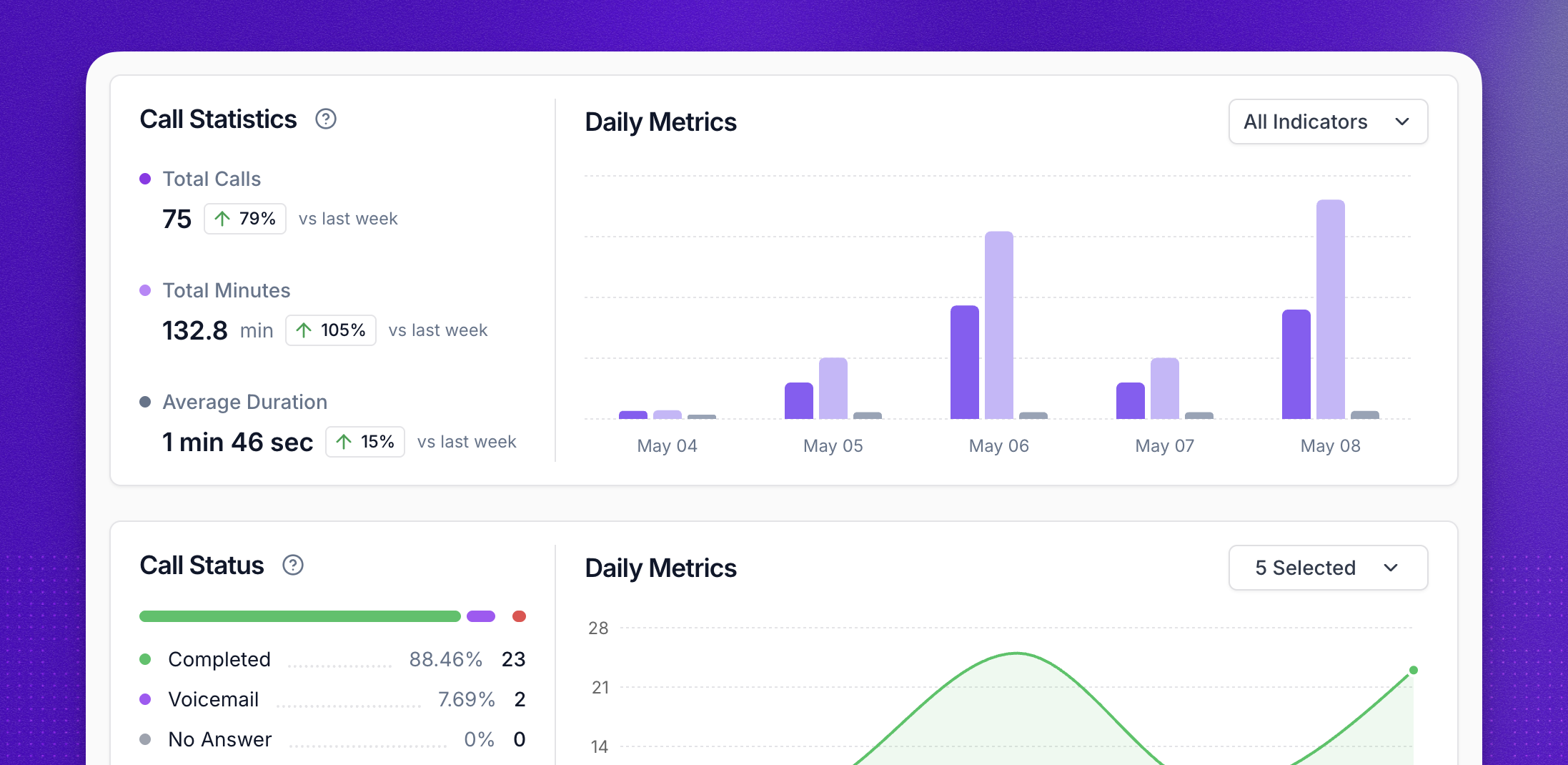
Together, these make up the Learn stage of Synthflow's BELL framework (Build, Evaluate, Launch, Learn). Aurora, the AI agent inside the Synthflow dashboard, reviews past conversations, flags where an agent's behavior is drifting from its instructions, and generates adversarial test cases.
Built-in monitoring covers the agents on that platform. If your contact center is running agents from several vendors, it still needs a layer that spans them all, and production monitoring works alongside pre-release testing, which Synthflow runs as simulations in its Test Center.
Which Outcomes Show a Voice Agent Is Working?
A voice agent is working when its calls achieve their intended purpose. Outcome metrics belong on the same dashboard as latency and word error rate:
In the end, what counts as completed depends on the agent's job. On a support line, a transfer can mean the agent couldn't finish. On a sales qualification line, handing a qualified caller to a rep is the goal. That’s why you need to set that definition per agent before you measure it.
Cost per call catches trade-offs: a larger, more accurate model can cut transcription mistakes and raise the cost of every call.
Synthflow judges its agents the same way, by outcomes and work completed, and its analytics report call outcomes and success rate for each agent. When an outcome drops, the layer metrics show where to look.
What Can You Record Without Breaking Compliance?
Call recordings and transcripts carry personal and payment data, so what you store, for how long, and who can see it are observability design decisions. The records that make a bad call easy to replay are the same ones regulators care about.
Synthflow's Trust Center lists ISO 27001, SOC 2 Type 2, HIPAA, GDPR, and PCI DSS v4.0.1. Inside each agent, the security and compliance settings decide what gets kept:
- Recordings and transcripts can each be switched off.
- Retention can be capped at 30 days, after which transcripts, recordings, and caller IDs are deleted.
- Personal information (PII) redaction strips card numbers, social security numbers, names, emails, phone numbers, and addresses from transcripts, webhooks, and logs.
Each setting trades some visibility for lower risk. Switching off transcripts also removes them from logs and analytics, and redaction covers text records, not the live audio stream. Decide which calls you'll need to replay before you choose.
Seeing Inside Your Next Bad Call
The account-number call took four checks to explain. You can run the same test on your own agents this week:
- Pick three recent calls that ended badly: an abandoned call, an unplanned transfer, a complaint.
- For each one, try to name the stage that failed using only what your setup records today.
- Wherever you get stuck, write down what was missing: the recording, the transcript, the model's input and output, or the turn timings.
That list is your observability backlog. If your agents run on Synthflow, each call's recording, transcript, and actions are already kept together in one log. To see how that works at your call volume, talk to the Synthflow team.
Common Questions About Voice AI Observability
Does Built-In Monitoring Remove the Need for Pre-Release Testing?
No. Built-in monitoring shows how agents behave with real callers, while pre-release simulation tests scenarios before any caller hears them, including rare ones that may not reach live traffic for weeks. Production teams need both.
Are There Free or Open-Source Voice AI Observability Options?
Yes. Open-source platforms such as Langfuse trace model calls, prompts, and timings, and accept data in the OpenTelemetry format. They cover instrumentation, so call recordings, audio quality, and turn-taking usually have to be added separately.
How Are Voice AI Evals Different From Standard LLM Evals?
Standard LLM evals score the text of a prompt and response. Voice AI evals score the spoken interaction: transcription accuracy, interruptions and turn-taking, audio quality, and whether the call reached its outcome.