Synthflow AI voice agents for Genesys Cloud
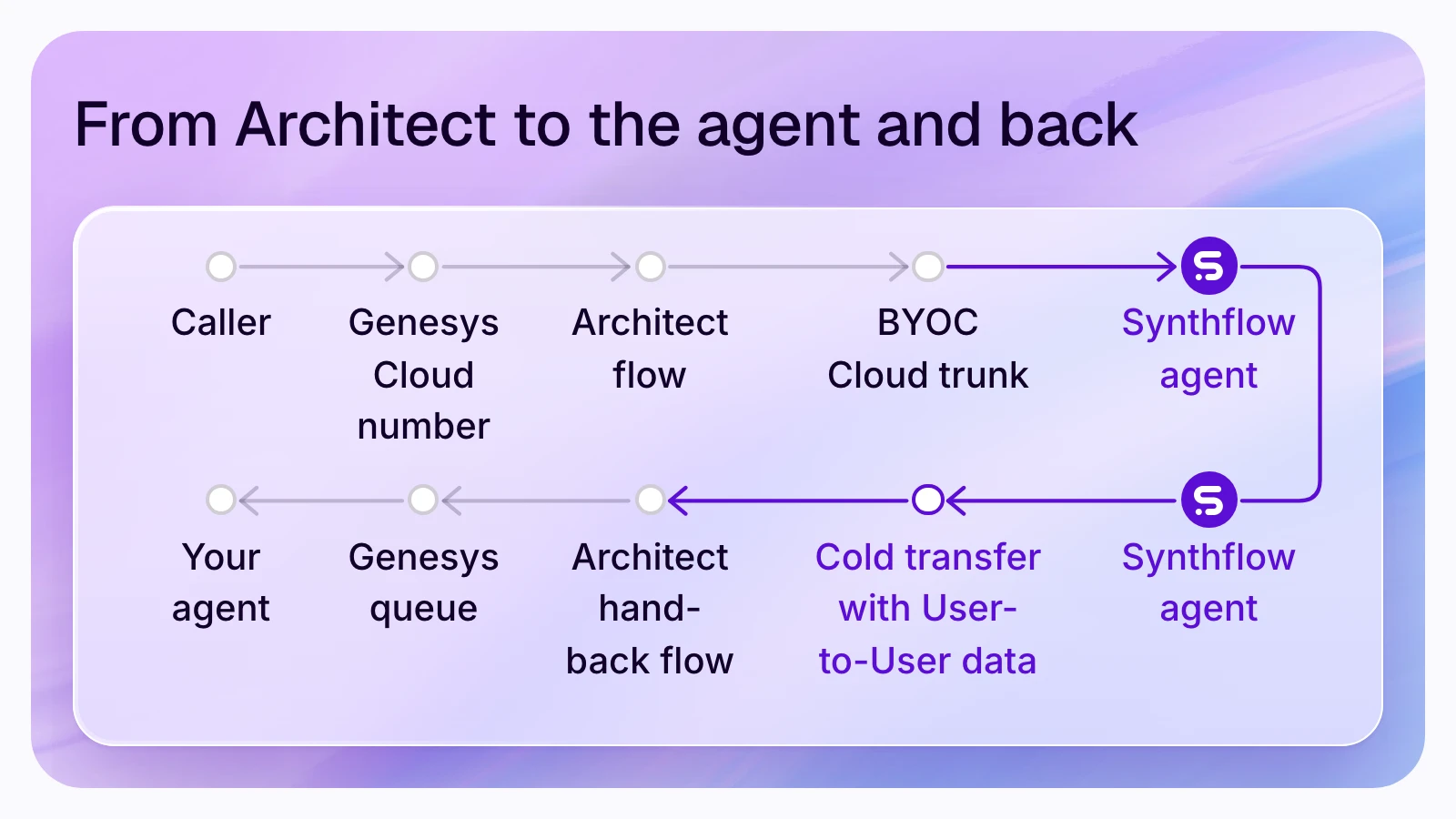
Synthflow's AI voice agents connect to Genesys Cloud CX over a BYOC Cloud SIP trunk: Architect sends the numbers or IVR branches you choose to the agent, and the agent hands callers back to a Genesys queue. What it learned travels in the SIP User-to-User header, which Architect reads as Call.UUIData and routes on.
Synthflow is an enterprise AI agent platform for phone operations. On Genesys Cloud it adds the agent and leaves your contact center as it is: numbers, Architect flows, queues and the people who answer stay in Genesys, while the agent takes the calls you route to it, places outbound calls over the same trunk and returns each caller with the data your flow needs. Synthflow runs its own telephony and handles 1M+ calls daily for 100+ enterprise customers, with 99.99% uptime (Synthflow facts), and its documentation lists Genesys Cloud among the phone systems "deployed with real customers" (telephony integrations).
See it on your own Genesys call flow
Call flow
How a call moves
One trunk carries the call both ways. Step by step, from Synthflow's Genesys Cloud guide and its pages on SIP transfers and variables:
- A customer dials your Genesys number. The number stays on your Genesys number plan. Synthflow imports it as a custom number whose SIP domain is your organization's BYOC address, such as synthflow.byoc.usw2.pure.cloud.
- Architect picks the calls. Your inbound flow sends the DIDs or IVR branches you chose to the Synthflow trunk; every other call keeps its flow.
- The call crosses the trunk to sip.synthflow.ai on port 32681, or 32682 for TLS, with digest authentication, and Genesys admits only Synthflow's signaling addresses.
- The agent knows the caller. The caller's number is a variable on every call, and an inbound webhook can return the caller's account before the conversation starts.
- The agent does the work, from its knowledge base and with custom actions in your systems while the caller waits.
- The agent hands the caller back. A cold transfer sends a SIP REFER over the same trunk to a SIP address in your Genesys organization, with the values it collected in one User-to-User header. The caller's own number stays on the call.
- Architect routes on that data. The flow at that address reads Call.UUIData, keeps each value as participant data and queues the call with a Transfer to ACD action.
- Synthflow keeps the AI's record: transcript, actions and outcome in each call log, and the post-call webhook sends them to your systems.
The trunk carries outbound calls too: the agent places them through Genesys, and a Genesys campaign or flow can send a call to the agent.
Who runs what
What Genesys keeps
Hand-off data
Hand-off data
Synthflow's guide says Genesys "reads call metadata from the SIP User-to-User header and ignores individual X-headers on a cold transfer". So the agent's transfer action lists the values as headers, in cold mode with Send as UUI header on, and Synthflow sends the values alone, in order, joined by a pipe or your delimiter, in hex or ASCII. What decides whether Architect sees them, from Genesys's pages:
- UUI Passthrough on. Genesys Cloud recognizes UUI data only once UUI Passthrough is enabled (Set UUI Data). It sits on the Synthflow trunk under Protocol (Genesys's steps), with Type set to User-To-User.
- Both encodings arrive whole. Genesys removes the first octet of a User-to-User header as its protocol discriminator, unless a pd parameter carries it (UUI data formats). Synthflow's hex payload starts with 00 and its ASCII payload carries pd=00, so your values arrive intact.
- 128 characters or fewer. Genesys accepts 28 KB but recommends 128 characters, because some systems discard longer data (UUI overview).
- ASCII for accented letters. Genesys cannot decode hex that turns into extended ASCII (characters 128 to 255), so send José in ASCII, or send an ID (UUI data formats).
- No secure flows. Call.UUIData is not available in secure call flows; pass values there as invocation data (Set UUI Data).
Worked example: the billing line
A billing agent hands back four values, listed in this order in its Synthflow transfer action:
Architect reads
disputes|48213977|yes|duplicate card charge: 43 characters, inside 128. In hex the header carries 88 characters, the 00 plus two for each of the 43, and Genesys decodes the same 43. The reason varies by call, so budget for the longest answer you expect.The hand-back flow in Architect checks the payload, keeps the values and picks the queue:
The person who answers sees the account and the reason without asking again, and a short payload still reaches a queue. The payload checker below runs the same sums on your values: length against 128, the header in hex and ASCII, a value that holds the delimiter or an accented letter, and each Architect expression.
Setup
Setup
You need a Genesys Cloud CX organization with BYOC Cloud enabled, a Synthflow agent on version 2.0 or later, a DID in E.164 format, and SIP and RTP open both ways to Synthflow's addresses. Four owners share the work:
A deployment goes live in weeks, depending on integrations, telephony setup, security review and launch requirements (pricing). Prove the dial plan in Genesys's Call Simulator and the hand-back flow in Architect's debug mode before real calls. Every field is in Synthflow's guide and in AI voice agents in Genesys Cloud, which compares other ways to put AI on Genesys calls and what each adds to the Genesys bill.
Fit
Fit and limits
Synthflow is for contact centers, BPOs and multi-location businesses on Genesys Cloud that want AI voice agents on chosen lines, inbound and outbound, handing callers back with data Architect routes on. It is sold as an annual enterprise agreement, scoped to your call volume, phone system, integrations, security needs and launch support (pricing).
Plan around these:
- Tier 2. Synthflow does not regression-test Genesys Cloud (telephony integrations), so deployments vary more than on Tier 1 systems such as Five9 and can need Professional Services: put launch support in the agreement.
- Throughput. Synthflow's guide says this trunk "provides basic SIP connectivity, and its throughput may be limited", and that "higher concurrency and priority routing" need an AppFoundry listing, so size your peak concurrent calls with Synthflow and your Genesys account team before you commit volume.
- BYOC Cloud. The guide is written for BYOC Cloud, and Genesys says UUI is not available for Genesys Cloud Voice calls (UUI overview), so on BYOC Premises or Genesys Cloud Voice, settle the route with both teams first.
- One try on a cold transfer. If the Genesys address does not answer, the call ends (call transfers), so point every hand-back at an Architect flow that always answers and queues.
- Transfers tested by real calls. The Test Center simulates transfers, and Synthflow's transfer page confirms the SIP REFER of a cold transfer only for Twilio and Telnyx, so test each hand-back reason with real calls on your trunk.
- Data into the agent. Synthflow reads X- headers, X-EI and Diversion on an incoming call, not a User-to-User header (call context), so get context from the caller's number and an inbound webhook lookup.
FAQ
Questions
Does Synthflow integrate with Genesys Cloud?
Is Synthflow in the Genesys AppFoundry?
Can the AI agent tell Architect why the caller needs a person?
Does the caller keep their number when the agent hands them back?
Can the Synthflow agent make outbound calls through Genesys Cloud?
Is Synthflow SOC 2 compliant?
Start
Start
Bring the DIDs or IVR branches you would send first, the queues for hand-backs and the values your Architect flows need. Synthflow's team scopes the trunk, the payload and the volume with you.
Talk to sales
Read next: AI voice agents in Genesys Cloud, AI call center software and all of Synthflow's integrations.
Sources read on 13 November 2026.