

Customer expectations have never been higher, and support teams have never been under more pressure to meet them. Faced with rising query volumes and finite headcount, more and more companies are turning to automation to bridge that gap – and the potential payoff is impressive.
McKinsey estimates that generative AI could lift customer care productivity by the equivalent of 30–45% of the function's current operating costs, and reduce human-serviced contacts by up to half in industries like banking, telecommunications, and utilities. In simple words, automation is becoming the operating model.
To help you embrace this new future, we’ve created this guide that covers what customer service automation is, the main types, the benefits and the limitations, and a practical, step-by-step path to getting started.
What Is Customer Service Automation?
Customer service automation is the use of technology to handle routine support tasks such as answering FAQs, routing tickets, and processing requests, without direct human involvement.
It works by combining different core technologies:
- Conversational AI interprets what a customer is asking.
- AI agents resolve the request or route it to the right place.
- Self-service portals and knowledge bases let customers find answers on their own.
- Interactive Voice Response (IVR) handles inbound calls.
It’s important to understand that the goal isn't to remove people from support – and if that’s what you’re looking for, you’ll quickly understand that a 100% AI workforce is still part of science fiction. Instead, you want to use automation to handle high-volume, repetitive queries so human agents can focus on the complex, high-value conversations that genuinely need them. Done well, customers get faster answers, and teams get breathing room.
Modern conversational AI platforms take this further by working across every channel a customer might use – voice, SMS, live chat, WhatsApp, and email – so the experience stays consistent wherever the conversation happens. This is what we call an omnichannel approach – a system where all the data is connected, and the context follows the customer.
.png)
Key Types of Customer Service Automation
When demand spikes, contact centers get overwhelmed: Too many queries, too few agents, and disconnected systems that leave customers waiting and agents burned out. Automation takes that pressure off. Here are the four most common types.
Self-service experience
Self-service is often the fastest win. Most customers would rather solve a problem themselves than wait in a queue, and the tools that let them do it are quick to set up:
- Detailed FAQ pages
- Password reset and account-management tools
- Chatbots that answer common questions on your website
- Product guides and knowledge-base articles
One rule matters above the rest: always leave a clear path to a human. Self-service should take care of the routine and pass anything that it can’t handle, not trap someone in a loop.

AI agent assistance
Beyond basic chatbots, AI agents handle the more involved, personalized conversations. They understand natural language, manage back-and-forth exchanges, and resolve issues with very little human input.
In practice, that means they take repetitive work off your agents' plates so the team avoids burnout, they pass full context when a conversation needs escalating so the customer never has to repeat themselves, and they stay available around the clock for the hours your agents aren't.
And because the underlying models learn from past interactions, they get more accurate over time. For example, Synthflow's AI phone agent can already verify identities, look up order status, and create tickets inside a single conversation, augmenting your agents rather than replacing them.
AI-powered IVR agents
Traditional IVR forces callers through rigid menus: "Press 1 for this, press 2 for that." AI-powered IVR replaces those menus with natural, conversational routing that understands open-ended questions, handles multi-turn conversations, and adapts to whatever the caller actually says.
Synthflow's AI agents go well beyond legacy IVR. They read intent using natural language understanding, make routing and scheduling decisions, and respond in real time, at any hour, on any channel, and in more than 30 languages. Callers often don't realize they're talking to AI at all, and when a query does need a person, the agent hands it over with full context intact.
Auto-generated tickets
Automated ticketing keeps support organized as volume grows. When a customer gets in touch through any channel, whether that's email, live chat, or social, the system creates a ticket and captures the key details for you.
From there, it can route and escalate a ticket on its own if it isn't resolved in time, and trigger the follow-ups, satisfaction surveys, and feedback requests that quietly feed your data back into the loop.
See how Synthflow automates customer service across voice, chat, and messaging – book a demo.
Benefits of Customer Service Automation
Done right, automation pays back across cost, speed, and experience all at once, and those gains compound as coverage grows.
The clearest win is cost. Letting AI handle high-volume L1 queries takes sustained pressure off headcount and overtime. Goldman Sachs estimates generative AI could raise labor productivity in developed markets by around 15% once it's fully adopted, and that it could automate tasks equal to roughly a quarter of all US work hours, much of which is exactly the repetitive support volume that clogs queues.
Then there's speed and availability. Automated support doesn't clock off, so customers get answers at 2 am as easily as 2 pm, without you staffing a night shift. Routine queries that used to sit in a queue get resolved in seconds, which pulls down average handle time and lifts first-contact resolution. In one McKinsey case study, a company with 5,000 customer service agents used generative AI to get a 14% increase in issues resolved per hour and a 9% drop in handling time.
The knock-on effects matter just as much. When automation absorbs repetitive work, your agents spend their time on the cases that genuinely need empathy and judgment, which is one of the better ways to curb the burnout that drives high turnover in contact centers. Every automated interaction is also logged and structured, so over time, you build a clear picture of why customers reach out, where the friction is, and what to fix next. Add it all up, and it shows in your CSAT and NPS scores.
To know whether automation is actually working, keep an eye on these metrics:
A platform like Synthflow is built to move these numbers. Its Freshworks deployment automated 65% of routine calls and cut wait times by 75%, while reducing agent workload by 60%.
How to Automate Customer Service
Automating support isn't a switch you flip; it's a sequence. Here's a practical path from first audit to ongoing optimization.
1. Audit your current support processes
Start by mapping how queries actually reach you, which channels carry the most volume, and where customers and agents keep getting stuck. Pull a few months of ticket and call data and group it by reason.
Most teams find a familiar pattern: a small handful of question types ("Where's my order?", "How do I reset my password?", "What are your opening hours?") account for the bulk of contacts. You can't automate what you don't understand, so this step decides everything that follows.
2. Identify the best opportunities
Go after the high-volume, repetitive, low-complexity work first. Order-status checks, appointment scheduling, password resets, and ticket routing are ideal early candidates because they're predictable and low-risk. A healthcare provider might start with appointment booking and reminders; a retailer might start with returns and delivery tracking. Leave the emotionally charged or highly complex cases with your human team for now.
3. Choose the right platform
Match the platform to your needs rather than the reverse. Enterprise teams should weigh channel coverage, integration depth, security and compliance certifications, deployment time, and one question that's easy to overlook: was the system built AI-native, or does it have AI bolted onto legacy infrastructure? That distinction shapes how naturally it handles real conversations.
4. Integrate with your existing stack
Automation only works when it can see your data, so connect it to your CRM, helpdesk, and knowledge base. That's what lets an AI agent verify a caller's identity, pull their order history, and create a ticket inside a single conversation, instead of bouncing them to a human for every lookup. Synthflow supports 200+ integrations across major CRM and CCaaS systems for exactly this reason.
5. Train and test before launch
Feed the system your real knowledge base, then stress-test it with simulations and edge cases before going live. Run the awkward phrasings, the angry customers, the questions it shouldn't answer. A short user-acceptance period catches the gaps that matter while the stakes are still low.
6. Launch with a clear escalation path
Don't switch everything on at once. Roll out to a defined set of use cases, ideally a pilot on one channel first, and get the handoff right: Every automated conversation needs a clean route to a human for when the AI hits its limits.
Decide what triggers an escalation, and make sure full context travels with it so the customer never repeats themselves to the person who picks up.
7. Monitor and optimize
Track CSAT, average handle time, first-contact resolution, and completion rate from day one, then go beyond the dashboard and read the transcripts. That's where you'll spot what the AI fumbled and find new automation candidates.
Use it to refine prompts, widen coverage, and A/B test changes before rolling them out, keeping version history so you can roll back if a tweak underperforms.
Ready to get started? Synthflow's AI-native platform lets you deploy a conversational AI agent in weeks, not months – talk to sales.
Challenges of customer service automation
Automation delivers most of its value when you go in clear-eyed about the limitations. Three issues come up again and again, plus one that enterprise buyers can't afford to overlook.
Lack of personalization
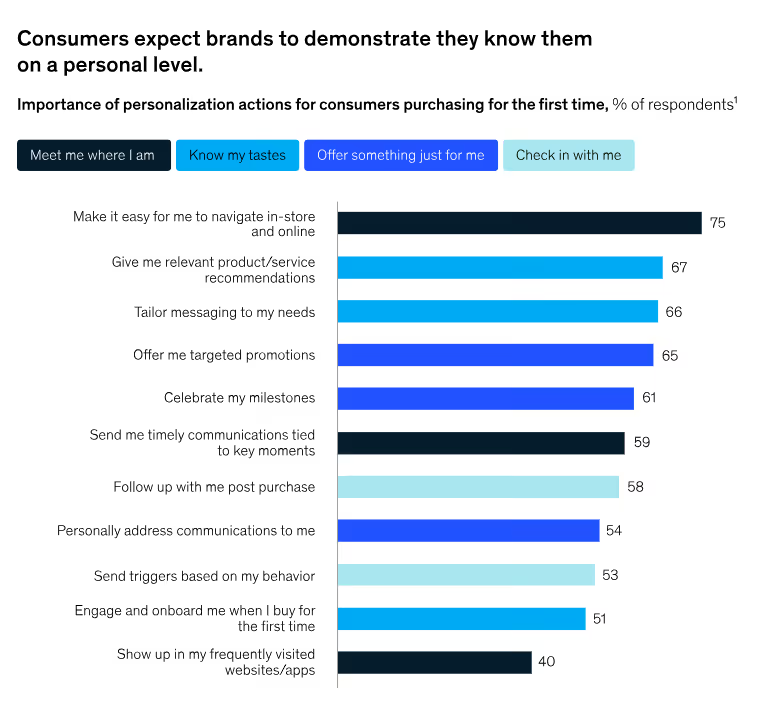
Personalization is now an expectation, not a perk. McKinsey found that 71% of consumers expect personalized interactions, and 76% get frustrated when they don't get them.
Customers want thoughtful touchpoints: Post-purchase check-ins, relevant recommendations, and being addressed by name. AI agents are well-suited to this, drawing on history to tailor each response.
For example, an agent helping a returning customer can reference a recent order and pre-empt the likely follow-up, instead of starting from a blank slate. Handled well, personalization resolves issues faster and deepens the relationship.
Customer frustration with chatbots
Here's the thing: Customers aren't really frustrated by AI self-service; they're frustrated by AI that leaves their problem unsolved. Verint's State of Customer Experience 2026 found that 69% of customers would happily switch from a human agent to automated service, as long as it fully resolves their issue, a figure that climbs to 93% among younger customers. The catch is that the same report found 79% would leave for a competitor after a single bad experience.
The fix, then, is resolution, not retreat. A chatbot earns its place when it:
- Resolves the most common questions end-to-end, rather than just deflecting them.
- Hands off to a human the moment it's out of its depth, with full context attached.
- Uses natural language understanding to read intent, not just keywords.

Having to Put the Customer on Hold or Transfer the Call
Few things grind a customer down like being put on hold, bounced between departments, and asked to re-explain their problem to each new person who picks up. It wastes their time, it tests their patience, and it quietly signals that the systems behind the scenes don't talk to each other.
AI call routing fixes this. Conversational IVR understands what the caller actually needs and sends them to the right place the first time, and when no agent is free, it can offer an automated callback instead of leaving them stuck on hold.
Data Security and Compliance
Automation touches sensitive customer data, so security and compliance can't be an afterthought, especially in regulated sectors like healthcare, insurance, and financial services.
Before you commit to a platform, check how it handles data residency, access controls, and audit logging, and confirm which certifications it actually holds. Look for ISO 27001, SOC 2, GDPR, and HIPAA compliance, and ask whether the vendor offers regional data tenants for customers with strict residency requirements.
The Future of AI-Driven Customer Service
Customer expectations keep climbing, and adoption is racing to keep up. In McKinsey's State of AI 2025, 88% of organizations said they were using AI in at least one business function, up from 78% a year earlier, though most are still moving from pilots to full rollout.
Three shifts in particular are shaping how brands keep pace.
Omnichannel customer service
Customers move between channels. They might start on live chat and call the next day, and they expect the conversation to carry over. Omnichannel service connects phone, chat, social, email, and self-service, so an agent (or AI agent) always has the full history.
The payoff is continuity: customers don't have to start from scratch each time, agents waste less effort piecing together context, and the whole interaction feels joined-up instead of fragmented. That kind of consistency is increasingly what keeps customers from drifting to a competitor.
Predict and proactively solve customer needs
The best teams don't wait for problems; they head them off. By reading patterns in interaction and usage data, AI can flag a likely issue before the customer even notices and reach out first. A utilities provider, for instance, might spot an outage pattern and notify affected customers before the calls start flooding in.
And the room to act is wide open: Accenture found that companies with the best service outcomes are 48% more likely to invest heavily in generative AI to sharpen their predictions, yet just 14% of executives say their company regularly uses data-driven insights to improve service.
Conversational AI for hyper-personalization
Conversational AI uses natural language to create genuinely human interactions, reading context, tone, and intent rather than just matching keywords.
In a support setting, that means an agent handling a billing query can pick up on a frustrated tone, pull the customer's recent account activity, and sort out the specific charge in question, instead of reading from a generic script.
It feels less like talking to a machine and more like talking to someone who already knows your account.
How does Synthflow AI help with customer service automation?
Most platforms in this space started out as something narrower, a voice tool, a chatbot, a developer API, and added the rest later. Synthflow is different. It's an AI-native conversational AI platform, built from the ground up on modern language models to automate customer support across every channel: voice, SMS, live chat, WhatsApp, and email.
That architecture is what lets it solve the problems we've worked through here. The personalization gap closes because Synthflow agents connect straight into your CRM and knowledge base, so they're working from real customer context in every conversation. The "stuck on hold" problem goes away because agents are available 24/7, in more than 30 languages, and hand off to a human with full context the moment one is needed, with no blind transfers and no repeating yourself.
For enterprise teams, the details are where it earns its place:
- AI-native architecture, built on LLMs rather than legacy IVR with AI bolted on.
- Owned telephony infrastructure, with sub-100ms latency, 99.99% uptime, and no dependency on third-party carriers.
- 200+ integrations, including Salesforce, HubSpot, and the major CCaaS systems.
- Enterprise-grade security: ISO 27001:2022, SOC 2, HIPAA, and GDPR certified, with regional data tenants.
- Deployment in 1–3 months, not the 6–12+ months legacy platforms tend to need.
- White-label capability, so agencies and partners can fully rebrand it.
The results back it up: 65M+ customer calls handled and 4M+ hours saved across deployments. In one case, a $230M BPO ran 600K+ calls a month across 40+ AI agents and went live in 60 days, with zero new hires.
Ready to see it on your own support? Book a demo, and we'll show you what Synthflow can do for your team.
Frequently Asked Questions
What Is Customer Service Automation?
Customer service automation uses technology, including conversational AI, AI agents, chatbots, IVR, and self-service portals, to handle routine support tasks without direct human involvement. It resolves high-volume, repetitive queries like FAQs and order-status checks on its own, which frees your human agents to focus on the complex, high-value conversations.
What Technologies Are Used for Customer Service Automation?
The core technologies are conversational AI and natural language understanding, which interpret what a customer means, AI agents that resolve or route requests, automated ticketing systems, AI-powered IVR for calls, and self-service knowledge bases. Modern platforms combine these across voice, chat, SMS, WhatsApp, and email for a consistent omnichannel experience.
How Much Does Customer Service Automation Cost?
It varies widely with the channels you cover, your query volume, integration depth, and whether you pick an AI-native platform or a legacy system with add-ons. Rather than fixate on the sticker price, weigh the total cost of ownership, including deployment time, professional-services fees, and per-interaction pricing, against the savings from faster handle times and lower agent workload.
Can Automation Replace Human Agents?
No, and that isn't the goal. Automation is best thought of as augmenting your agents, not replacing them. It absorbs the repetitive, high-volume queries so people can focus on the sensitive cases that need empathy and judgment. The strongest setups pair automated resolution with a smooth, context-rich handoff to a human whenever one is needed.
How Do You Measure Customer Service Automation Success?
Track a mix of experience and efficiency metrics: CSAT and NPS for satisfaction, average handle time and first-contact resolution for speed, and completion (or containment) rate for how much gets resolved without a human. Define success against your own goals first, since for some teams a clean handoff to a person is the win, and for others it's full AI resolution.