
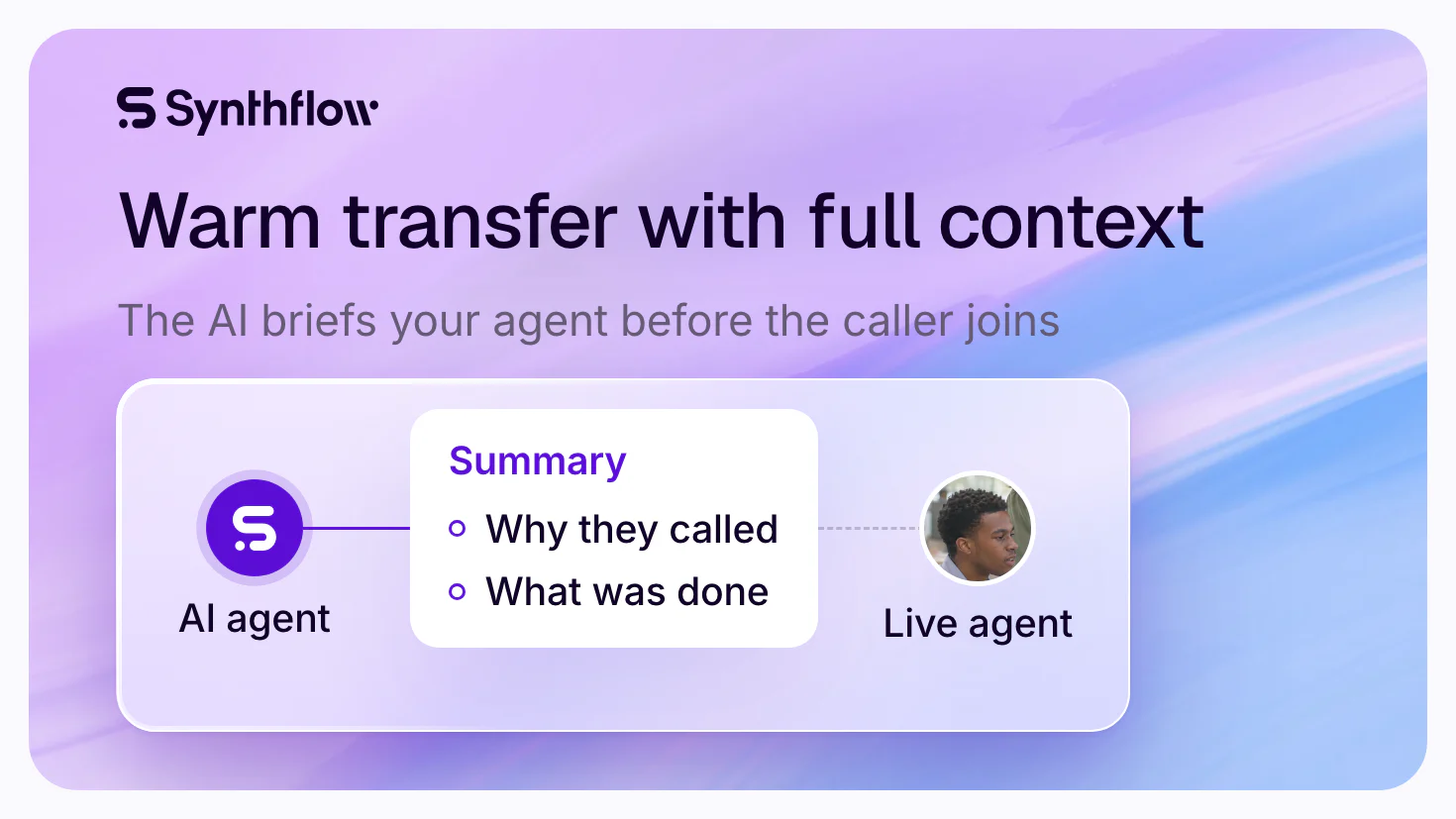
A voice AI agent warm transfer hands the caller to a live agent with the full context of the call, so nobody has to repeat themselves. Synthflow's AI voice agents do it inside the phone system a contact center already runs, and Batteries Plus runs them inside Zoom Phone across 700+ U.S. stores.
Before connecting, the agent waits for a person to answer, plays them an AI summary of the conversation and passes the caller's details into the system. At Batteries Plus, a caller who needs a person gets a warm transfer to a human expert with the full transcript and any actions already taken (Batteries Plus story).
Who runs it, and who documents it
Synthflow is an enterprise platform for AI voice agents that answer and make phone calls for contact centers, BPOs and businesses with many locations, on its own telephony. It handles 1M+ calls daily for 100+ enterprise customers with 99.99% uptime (Synthflow facts). Its customers, partners and the press describe it in their own words:
| Source | What it says |
|---|---|
| Chain Store Age | At Batteries Plus, "When a caller needs a human being, the agent completes a warm transfer to a human expert, passing along the full transcript and any actions already taken"; "Synthflow AI says its agents have already resolved 22,000 calls independently at Batteries Plus across more than 700 locations." |
| Zoom, in the 20 Oct 2026 release | Kentis Gopalla, head of product, Zoom CX Ecosystem: "keeping context, quality, and control in one place for both agents and customers" |
| Five9's documentation | Synthflow is "an accredited third-party AI provider", and Five9 receives "the call transcript returned by Synthflow" |
| Freshworks' documentation | Freshcaller's AI agent handover "works with AI Agents created in third-party apps, such as Synthflow", and the live agent sees "a detailed Handoff Summary", "ensuring customers don't have to repeat themselves" |
| PYMNTS | "Edison, an AI voice assistant developed with Synthflow that answers store calls in both English and Spanish" |
| G2 | Synthflow is rated 4.5 out of 5 by 1,000+ reviewers |
"From kick-off to pilot, the roll-out with Synthflow and Zoom was just five weeks. This is one of the most impressive integrations I've seen between two pieces of software," says Kranthi Malreddy, Chief Information Officer of Batteries Plus (Batteries Plus story). The agents there respond in under half a second, and rather than another pilot, Batteries Plus went live across its full network.
Book a demo to see a warm transfer into your own phone system.
How a Synthflow warm transfer runs
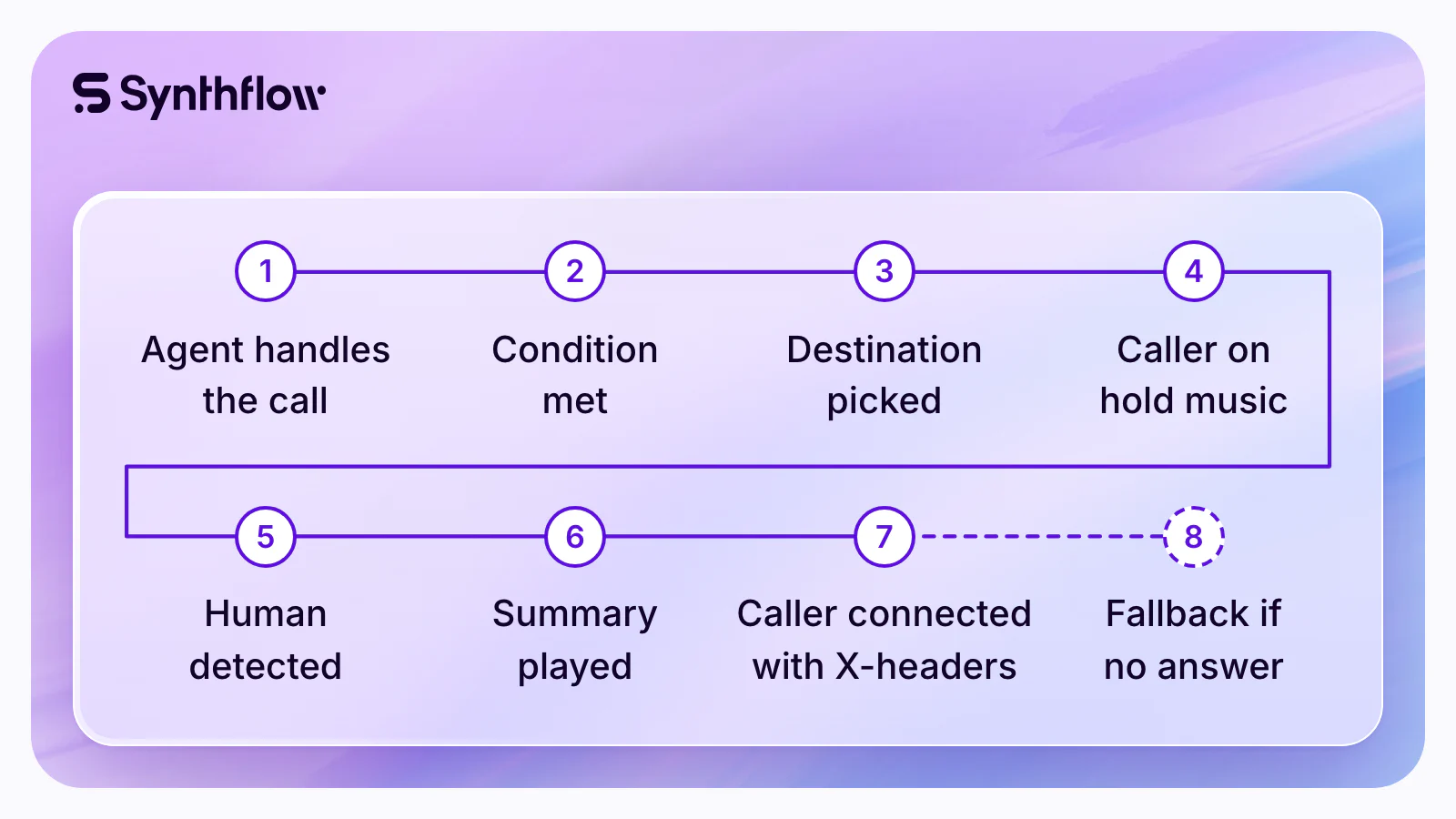
The AI handles the front of the conversation, then makes a warm transfer when a person is needed. Step by step, as Synthflow's documentation sets it out:
- The agent does the work it can. It answers, finds out why the person called, looks up the account and acts in your systems, so routine requests end without a transfer.
- A condition starts the transfer. You write it in plain words, for example only when the caller mentions a live agent. The agent says: "Let me connect you to our support team. They'll have the details I collected so far."
- The agent picks the destination. A number, a SIP address in your PBX or contact center, a phone book of up to 50 numbers that routes to the right store or department by location, service type or fallback condition, or a dynamic transfer that finds the right person in your CRM during the call.
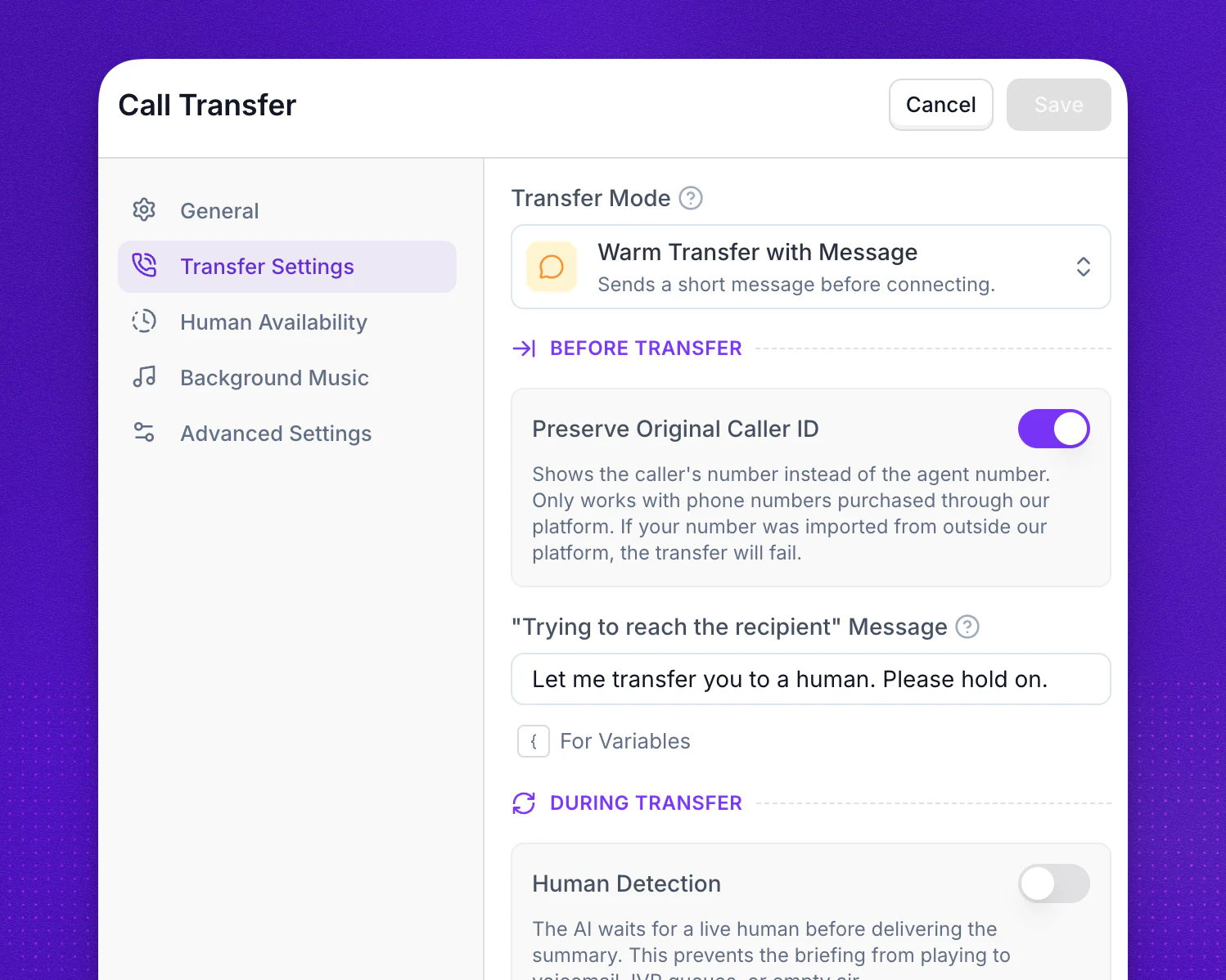
- The caller is not left in silence. A "Trying to reach the recipient" message plays, then hold music: Classical, Ambient or Modern Jazz.
- The agent waits for a person. Human detection holds the briefing until a live human answers, for 30 seconds up to 30 minutes, so it never reaches voicemail or an IVR.
- The person is briefed. They hear a whisper message or an AI-generated summary of the conversation, and with call screening they accept or decline the call.
- The caller is connected, with the data. Custom SIP X-headers carry details such as the appointment reason, name and location into your phone system, and recording can continue after the handoff.
- If no one answers, the call goes on. Each attempt ends in one of ten outcome states with its reason, and the agent tries the next destination in priority order or picks the conversation back up. Outside the human availability hours you set, it says your "Human not available" message.
You configure it in the Synthflow app or through its API, without writing code.
Three transfer modes
| Mode | What the person who answers hears | Caller ID they see | If no one answers |
|---|---|---|---|
| Cold | Nothing: SIP REFER hands the call off | The caller's own number | The call ends |
| Warm with message | A short whisper message, with the call's variables in it | The agent's number, or the caller's or a custom number you set | The agent retries, tries the next destination or resumes |
| Warm with summary | An AI summary of the conversation, from Auto or your own prompt | The same as warm with message | The same as warm with message |
Each mode works with every destination: a number, a SIP address, a phone book or a dynamic transfer (call transfers).
The context the live agent gets: a template
Copy the table and keep the rows your team needs. An info extractor has the agent pull a value out of the conversation at the moment of transfer (SIP transfers).
| What the person needs | Where Synthflow takes it from | How it reaches them |
|---|---|---|
| Why the caller called | An info extractor: "Classify the caller's intent as one of: make a claim, cancel policy, billing question, general inquiry" | The summary, and the header X-Customer-Intent |
| Who the caller is | An info extractor ("What is the caller's name?") or your pre-call webhook's data | The header X-Caller-Name |
| What was already done | The results of the actions the agent ran during the call | The summary; at Batteries Plus, "the full transcript and any actions already taken" |
| A case or queue reference | A variable mapped to an action's result, such as X-Reference set to <queue_ref> | An X-header, or one User-to-User header on a cold transfer |
| The whole conversation | The call's transcript and recording | The call log and the post-call webhook; on Five9, X-Transcript |
A summary prompt to start from (Custom, under Summary Prompt):
Summarize this call for the person who answers, in three short sentences: the caller's name and account number, why they called, what has been done so far and whether they are calm or upset. End with what the caller wants next.A whisper message built from the call's variables: "Caller wants to schedule an oil change for a 2021 Ford F-150, prefers Thursday afternoon." It removes repetition, shortens handle time and improves the customer's experience.
Inside your phone system
| Phone system | How the caller reaches a person | What travels with the call |
|---|---|---|
| Zoom Phone, Zoom Contact Center | Warm transfer to your Zoom numbers over SIP | At Batteries Plus, the full transcript and actions taken |
| Five9 | Five9 Handoff returns the call to your VCC workflow, which routes it to a skill or agent | Route headers, "short summaries" in X-CustomMetaData, the transcript in X-Transcript (Five9) |
| RingCentral RingCX | RingCX Handoff returns the call to Workflow Studio's queue, skill or transfer nodes | Your payload fields in sessionData (docs) |
| 8x8 Contact Center | 8x8 resumes the call in your script, on your queues, skills and routing, in 8x8 reporting | Variables your agents see when the call is offered (docs) |
| Freshcaller | The Voice AI Agent Handover call flow routes it to a live agent | "A detailed Handoff Summary" (Freshworks) |
| Genesys Cloud | SIP transfer over the BYOC trunk to a Genesys queue | X-headers, or the User-to-User header on a cold transfer (docs) |
| Twilio, Telnyx, Vonage, any SIP PBX | Warm transfer to a SIP address; on Twilio and Telnyx also to any number, warm or cold | X-headers on the SIP leg |
Synthflow's documentation marks Twilio, Telnyx, RingCentral RingCX, Vonage, 8x8, Zoom Phone, Zoom Contact Center and Five9 as "Actively tested and supported", with Freshcaller set up through the Freshworks integration. Genesys Cloud, Talkdesk, Dialpad, 3CX, Aircall and Asterisk "have been deployed with real customers", each with an integration guide. With Twilio, your "Numbers stay in Twilio while routing, recording, and call transfers run through Synthflow" (Twilio).
Worked example: a service call at a business with many locations
A caller wants an oil change at their nearest store. The agent answers on a number bought in Synthflow, collects the vehicle and the preferred day, and transfers the caller who asks for a person. The settings of Synthflow's call transfer action:
| Setting | Value in this example |
|---|---|
| Condition | The caller asks for a person, or wants a slot the agent cannot confirm |
| Destination | Dynamic: a custom action returns the caller's store desk (priority 1), the regional team (2) and the general queue (3) |
| Mode | Warm with summary, with the prompt above |
| Human Detection Timeout | 45 seconds |
| Timeout | 30 seconds, the default |
| "Trying to reach the recipient" message | "One moment, I'm connecting you to the service desk at your store." |
| Human Availability | Monday to Saturday, 8:00 to 18:00 in the store's timezone |
When the store desk answers, the advisor hears the summary and the caller joins. When the desk rings out for 30 seconds, the attempt reports transfer-failed-timeout and the agent dials the regional team; a voicemail greeting reports transfer-failed-voicemail and moves on the same way. On a Sunday, the agent says the "Human not available" message and keeps helping. Each attempt shows in the call log with its outcome, and human_connected_at marks when the person joined: the base for your transfer success rate and time to a person.
For where each call should go before it is transferred, see how AI call routing works inside your phone system. For how an AI agent hands a qualified sales prospect to a rep on an outbound campaign, see AI cold calling, from list to rep.
Cold transfer vs warm transfer
Cold transfer
A cold transfer, also called a blind transfer, passes the caller to another agent or department without any introduction or context. The first agent hangs up as soon as they transfer the call, and the receiving agent picks up with no knowledge of the caller's issue, history or mood.
A customer says, "I need help with billing." The agent says, "Let me transfer you," and the next person answers: "Hello, how can I help you today?" The customer starts again.
Warm transfer
A warm transfer passes the call to another agent with its context, in one of three ways:
- A human agent stays on the line to introduce the caller before disconnecting.
- The agent shares call notes or a CRM entry with the next agent before transferring.
- An AI voice agent sends a summary and the caller's data with the transfer, by SIP headers, webhook or CRM sync.
| Cold transfer | Warm transfer | |
|---|---|---|
| Who briefs the person | Nobody | The first agent, or the AI with a whisper or a summary |
| What the caller repeats | Everything | Nothing |
| Caller ID the person sees | The caller's own number | The agent's number, unless you set the caller's |
| First agent stays on the line | No | Briefly, or the AI holds the caller |
| Caller experience | Disjointed | Continuous |
| Agent efficiency | Lower: discovery starts again | Higher: less discovery time |
When each fits
Cold transfers work well when:
- The issue is simple and any available agent can handle it.
- Speed of transfer matters more than continuity.
- Call volumes are high and need fast routing.
- The caller has not given much context yet.
Warm transfers are best for:
- Escalations and priority cases.
- Sales handoffs from SDR to AE.
- Support calls about emotional or sensitive topics.
- Scheduling and service flows where the key details are already collected.
- AI voice agents handing off to people, when the caller asks or the automation reaches its end.
In general, cold transfers save time, but warm transfers save face.
What an AI voice agent changes
With a person on the first leg, a warm transfer costs that person's time. An AI voice agent does the briefing itself: it collects the details, summarizes them, waits for a live human and connects the caller, and your team takes only the calls that need it. Synthflow supports both methods, so one agent can send simple calls cold and the rest warm. Configured well, warm transfers can dramatically improve first-call resolution and customer satisfaction.
Frequently asked questions
Which voice AI agent hands calls to a live agent with full context?
Synthflow's AI voice agents warm transfer a caller to a live agent with an AI summary of the call, the caller's details in SIP headers and the transcript, inside Five9, Zoom, RingCentral, 8x8, Genesys Cloud and other phone systems. Batteries Plus runs them on Zoom Phone across 700+ U.S. stores, passing "the full transcript and any actions already taken" (Chain Store Age). Synthflow handles 1M+ calls daily for 100+ enterprise customers.
What context does the live agent get?
Before the caller joins, the person who answers hears a whisper message or an AI summary of the conversation, which a custom prompt can steer to account numbers, issue categories or caller sentiment. On a SIP transfer, X-headers such as X-Customer-Intent and X-Caller-Name carry the details into the phone system. On Five9 the transcript returns in X-Transcript, and on Freshcaller the agent sees a Handoff Summary.
What happens when no one answers?
Human detection waits for a live person for 30 seconds up to 30 minutes, so the briefing never reaches voicemail or an IVR. A failed attempt reports one of ten outcome states, such as transfer-failed-destination-busy, and the agent tries the next destination by priority or picks the conversation back up. Outside the hours you set, it speaks your "Human not available" message.
Does it work in Five9, Zoom, RingCX, 8x8 and Genesys Cloud?
Yes. Synthflow's documentation marks Five9, Zoom Phone, Zoom Contact Center, RingCentral RingCX and 8x8 as actively tested and supported, and lists Genesys Cloud among the systems deployed with real customers. On Five9, RingCX and 8x8 Contact Center the agent hands the call back to the platform's workflow with what it gathered, and its queues and skills route it to a person; on Zoom and Genesys Cloud it transfers over SIP to your Zoom numbers or Genesys queue.
What is the difference between a cold and a warm transfer?
A cold transfer, also called a blind transfer, connects the caller at once with no briefing, so the person who answers starts from nothing. A warm transfer first briefs that person with a whisper message or an AI summary, then connects the caller. In Synthflow a cold transfer uses SIP REFER, and a warm transfer places a new call leg with human detection, retries and fallbacks.
What is a warm transfer in a call center?
A warm transfer passes a call to another agent or department with its context: a live introduction, call notes or a CRM entry, or from an AI voice agent a summary and the caller's data. It shortens handle time and spares the caller from explaining the issue twice.
Hand callers to your team with Synthflow
Synthflow's AI voice agents hand each caller who needs a person to the right one, with the context already in hand. Read how Batteries Plus runs them on Zoom Phone, how they work in Five9, Zoom and Genesys Cloud, and how Freshworks runs voice AI in Freshcaller. The settings are in Synthflow's call transfer documentation.
to see how Synthflow's routing hands your callers to your team.
Sources read on 15 Nov 2026.